
Emergency vs iPhone Emergency SOS vs Staying Alive vs Emergency 114: which solution should you use?
In case of immediate danger, the priority remains simple: contact emergency services. In France, the main numbers are 15 for SAMU medical emergencies, 17 for police, 18 for fire services, 112 for European emergencies and 114 for people who are deaf, deafblind, hard of hearing or aphasic.
Alongside these numbers, several apps and features can help you prepare better: Emergency SOS on iPhone, Emergency 114, Staying Alive and the Emergency app. They do not all do the same thing. This page helps you understand their differences, their limits and when to use them.
Quick summary
- iPhone Emergency SOS: Apple’s built-in feature to quickly call emergency services and notify your emergency contacts.
- Emergency 114: official public service to contact emergency services by video, chat, SMS or images when a voice call is not suitable.
- Staying Alive: app specialized in cardiac arrest, defibrillators and the citizen responder network.
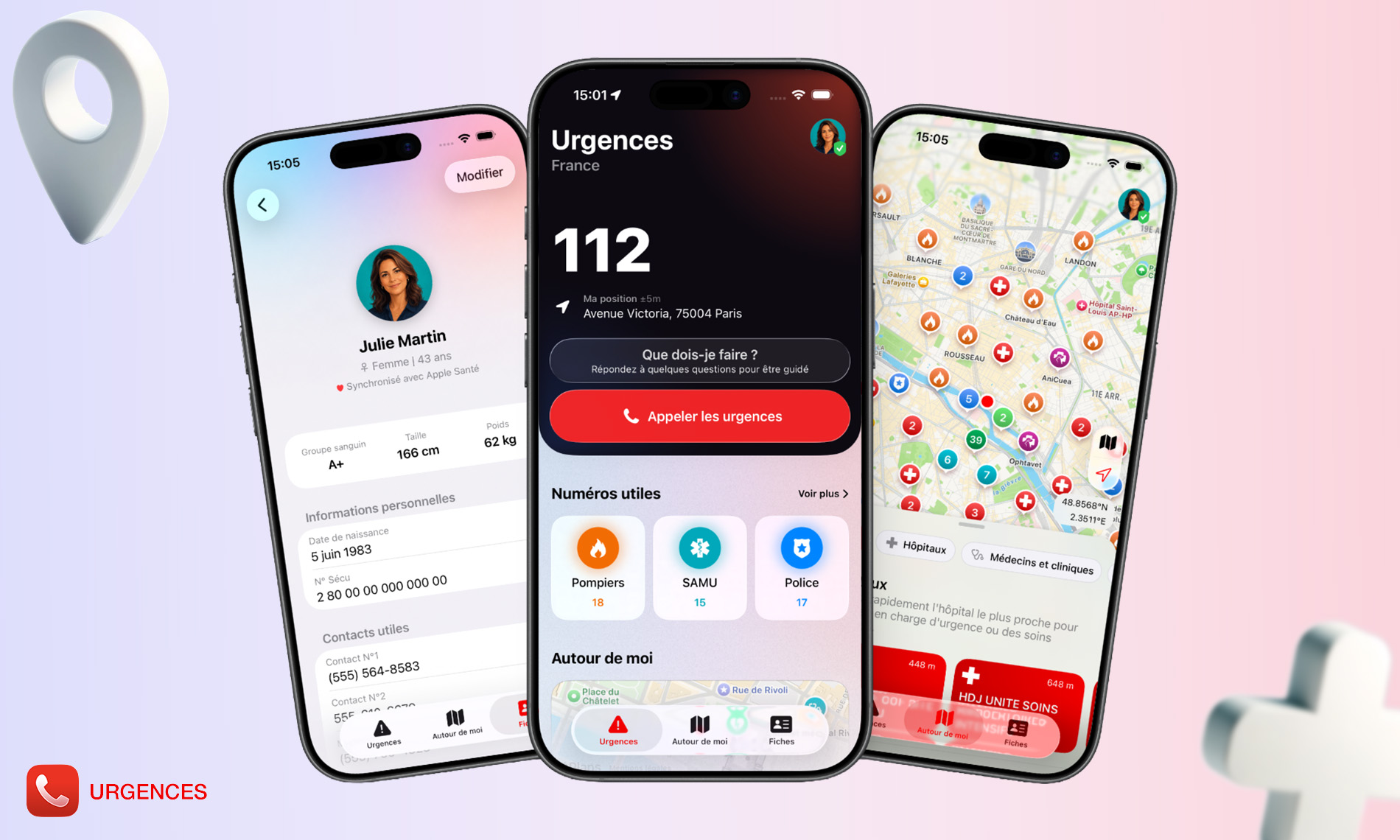
- Emergency: general personal safety app to keep emergency numbers, medical information, useful locations and essential shortcuts in one place.
Comparison of the main emergency solutions on iPhone
| Solution | Main purpose | Strengths | Limits | Best used for |
|---|---|---|---|---|
| iPhone Emergency SOS | Quickly calling emergency services from iPhone or Apple Watch. | Already built into iOS, fast, reliable, linked to emergency contacts and Apple Medical ID. | Very useful feature, but limited: it does not centralize all useful numbers, nearby emergency locations or profiles for several loved ones. | Triggering an emergency call quickly. |
| Emergency 114 | Contacting emergency services without a standard voice call. | Official public service, free, available 24/7, accessible by video, chat, SMS and images. | Specialized service for people who are deaf, deafblind, hard of hearing, aphasic or when speaking is impossible. | Emergencies requiring written, visual or adapted communication. |
| Staying Alive | Locating defibrillators and mobilizing citizen responders. | Highly relevant for cardiac arrest, AEDs, training and citizen intervention. | Less general: the app focuses on cardiac arrest and defibrillators. | Cardiac arrest, CPR, finding a defibrillator. |
| Emergency | Centralizing useful information before and during an emergency. | Emergency numbers, medical profile, widgets, Apple Watch, map of useful locations, decision support and information for yourself, your loved ones or your pets. | Does not replace official emergency services, does not provide a medical diagnosis and depends on available data depending on countries and categories. | Preparing your information, acting faster, finding the right shortcuts and useful nearby locations. |
Emergency does not replace iPhone Emergency SOS
iPhone Emergency SOS is an essential feature. It lets you quickly call emergency services, sometimes even from the Lock Screen or Apple Watch. Every iPhone user should know how it works and configure their Apple Medical ID.
The Emergency app addresses another need: preparing, grouping and making useful information accessible before a problem happens. It helps you find emergency numbers, display medical information, view useful nearby locations and access shortcuts from widgets or Apple Watch.
So the right choice is not one or the other. iPhone Emergency SOS should remain enabled. Emergency works alongside it to organize information and quick access features that Apple’s built-in feature does not fully cover.
Emergency does not replace Emergency 114
Emergency 114 is an official public service. It is designed to allow people who are deaf, deafblind, hard of hearing or aphasic to contact emergency services in France. It can also be useful when someone cannot speak.
Emergency can help raise awareness of 114 and keep the right numbers within reach, but the app does not replace the 114 service. If this applies to you, it is recommended to download and configure the official Emergency 114 app directly.
Emergency does not replace Staying Alive
Staying Alive is a reference for cardiac arrest. Its main value is clear: locating defibrillators, learning lifesaving actions and enabling citizen responders to intervene quickly when alerted.
Emergency can display defibrillators among other useful locations, but its role is broader: it also brings together emergency numbers, medical profiles, hospitals, pharmacies, police services, fire stations, veterinarians and other points of interest depending on the covered areas.
In case of cardiac arrest, Staying Alive is a very relevant app. For more general preparation for everyday emergencies, Emergency is more cross-functional.
What the Emergency app offers
- Quick access to useful emergency numbers according to the country.
- View your location and useful information to call emergency services.
- Create a medical profile with important information: identity, blood type, treatments, conditions, emergency contacts and doctor.
- Display certain information from the Lock Screen using widgets.
- Use shortcuts on iPhone and Apple Watch.
- Find emergency locations around you: defibrillators, hospitals, pharmacies, police, fire stations or veterinarians depending on available data.
- Get step-by-step guidance with a decision-support flow when you do not know what to do.
- Prepare information for yourself, a loved one, a child or a pet.
When should you install Emergency?
Emergency is especially useful if you want to prepare for situations before they happen. The app can be useful in many everyday cases:
- You are a parent and want to keep your child’s medical information accessible.
- You travel and want to quickly find the emergency numbers of the country you are in.
- You do sports, hiking, cycling or higher-risk activities.
- You support an elderly, ill or vulnerable loved one.
- You want your emergency contacts and medical information to be visible more quickly.
- You want to find a pharmacy, hospital, defibrillator or veterinarian around you.
- You want to prepare a profile for your pet in case of hospitalization or an unexpected situation.
What Emergency does not do
To be clear, Emergency is not an official emergency service and never replaces calling emergency services.
- The app does not replace 15, 17, 18, 112 or 114.
- It does not provide a medical diagnosis.
- It does not guarantee that a displayed location is open or available at the exact moment you need it.
- It does not replace first aid training.
- It must not delay a call to emergency services in a real emergency.
Its goal is different: to help you access useful information and actions faster.
Which app should you choose?
The best approach is not to choose only one solution. These tools complement each other.
- Configure iPhone Emergency SOS and your Apple Medical ID.
- Install Emergency 114 if you are concerned by a situation where a voice call may be impossible or unsuitable.
- Install Staying Alive if you want to be better prepared for cardiac arrest and defibrillators.
- Install Emergency if you want to centralize your numbers, medical profiles, shortcuts and useful nearby locations.
Why Emergency can be useful as a complement
In a stressful situation, the problem is not only knowing a number. You often need to find information, locate a place, know what to say, notify a loved one, find a medical profile or quickly access a shortcut.
Emergency was designed around this logic: reducing scattered information and making important actions easier to access. The app does not claim to replace emergency services, but it can help you prepare better and save time.
Frequently asked questions
What is the best emergency app on iPhone?
There is not one single best app for every case. iPhone Emergency SOS is essential for calling quickly. Emergency 114 is essential for people who cannot communicate through a standard voice call. Staying Alive is very relevant for cardiac arrest. Emergency is useful for centralizing information, numbers, medical profiles and emergency locations around you.
Does Emergency replace emergency services?
No. In case of immediate danger, you must call emergency services. Emergency helps you prepare and find useful information faster, but the app never replaces an official emergency service.
Does Emergency replace Apple Medical ID?
No. Apple Medical ID remains important and should be configured in the Health app. Emergency can complement this preparation with its own profiles, widgets, shortcuts and organized information within the app.
Does Emergency work abroad?
Emergency provides numbers and information depending on countries and available data. When traveling, it is recommended to check the information before departure. In the European Union, 112 remains the European emergency number to know.
Does Emergency show defibrillators around me?
Yes, when data is available in the relevant area, Emergency can display nearby defibrillators. For cardiac arrest and the citizen responder network, Staying Alive also remains a specialized app worth knowing.
Is Emergency useful if I already have an Apple Watch?
Yes, because Apple Watch can be an excellent way to quickly access certain information or shortcuts. Apple Watch Emergency SOS remains important, and Emergency can complement this logic with its own quick access features.
Is Emergency useful for families?
Yes. It is highly relevant for families, parents, caregivers and people who want to prepare information for several profiles: themselves, a child, a loved one or a pet.
Useful sources
- Service-Public.fr: emergency numbers in France
- Apple: configure and view a Medical ID on iPhone
- Apple: emergency calls on iPhone and Apple Watch
- Emergency 114: official public service
- Staying Alive: defibrillators and citizen responders
- Mac4Ever: article about the Emergency app
Download Emergency
Emergency is available on iPhone. The app can be used to prepare your medical information, access useful numbers faster and find emergency locations around you depending on available data.
Download Emergency on the App Store
Important: in case of a life-threatening emergency, call emergency services immediately. Do not wait to open an app if the situation requires a rapid response.